Features
Pricing
About Us
Sign up
Log in

Keep the work moving.

A tool in your toolbox to glue everything together.

Sign up Log in
F.A.Q.
Free Access
Crash course
Compare Dougal
Onboarding
Version 3.1

Dougal is a scheduler and job tracking app built for simple, fluid day-to-day use.
Keep jobs, visits, notes, photos and follow-ups organised without getting buried in admin.

* Ideal for plumbing, HVAC, electrical, maintenance, inspection and other field-service businesses.
Working for yourself or with a team
Effortless enough for sole traders who wouldn't normally use an app at all. Yet capable enough for larger businesses that want to get work done without getting bogged down.

Manage a whole crew from your desk during the day, or just go through your own jobs on the couch from your phone in the evening.
One account. All your devices.
One job. One view.
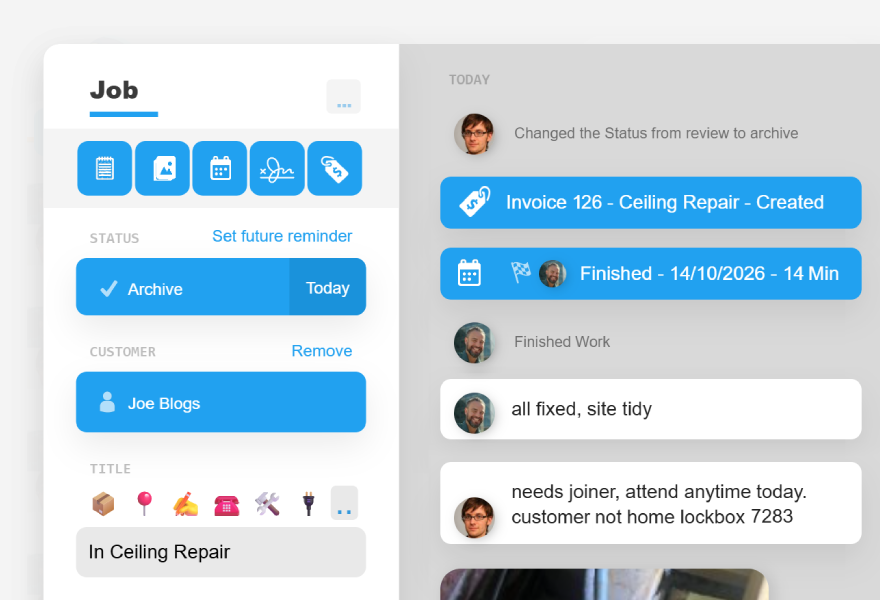
Keep notes, photos, visits, customer details, bills and job history together in one simple journal.
Less Juggling
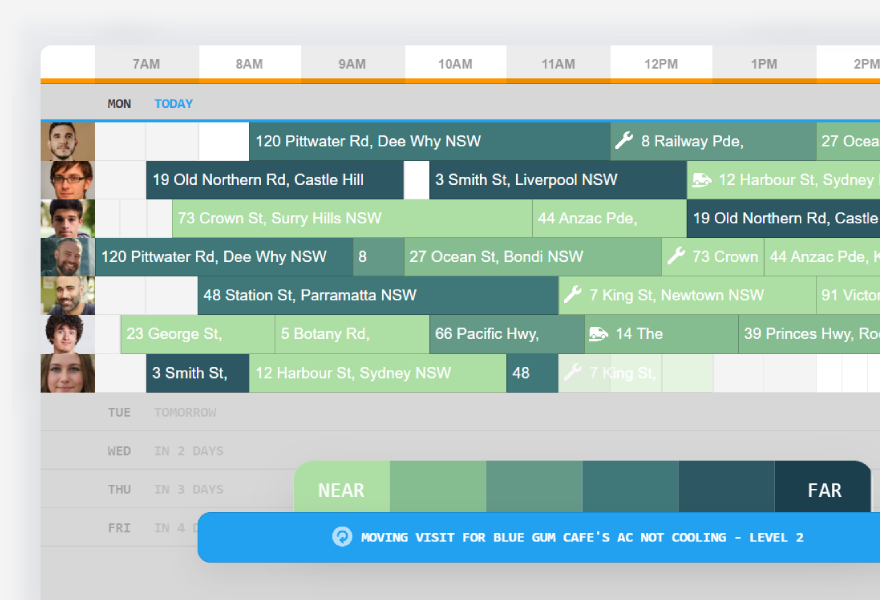
A easy to use yet powerful calendar with realtime updates, drag visits and distance based colouring when making bookings.
Field Work,
Not Paperwork
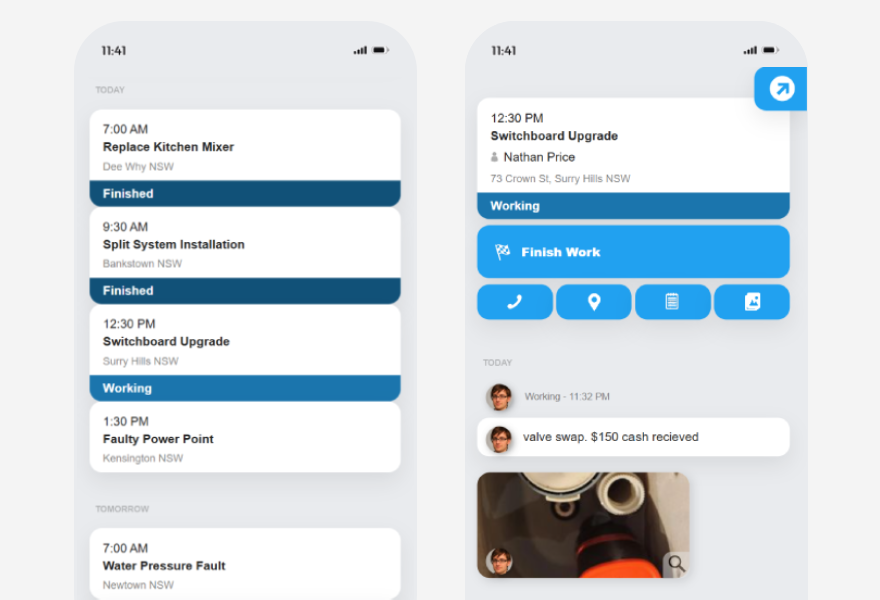
When out in the field get a simple view of the days job in front of you with quick access to adding notes and photos. A system for people who have actual work to do.
Keep The Tools
You Use
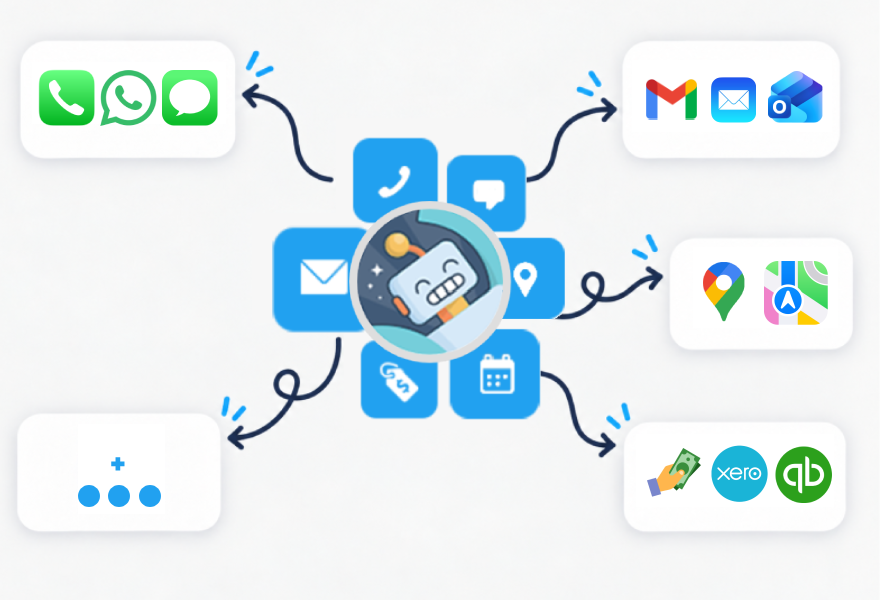
Visits can become timesheets or labour on bills. Adresses, bills or contact details can open up in your own preferred apps. Dougal is built around fitting in with your business not taking over.
Free Users
No card required, no feature restrictions
Starting a new business or learning new software is hard enough. We will cut you a break while you are still getting on top of things.
See Options
Paid Users
$7.99/m
Sign Up
Active Users No Lockin Human Support
* Active users are team members with enabled access to the field companion or manage desk.
* Cancel whenever. Access continues until the end of your current billing period.
* Dougal is both a business and a passion project for us, and we genuinely want to hear your feedback, suggestions, bug reports, or any problems you run into.

support@dougal.app
50,000+
Jobs, visits and customers organised.
Our Story
In 2018, Andy co-founded a local plumbing company. A hobby programmer, he spent his evenings building Dougal and his days testing it as a manager and scheduler. Over several years, the two projects grew together with dougal being built around what the business actually needed.

In 2024, growing interest from other local businesses led to Dougal becoming available to everyone. Since then, Dougal has become its own company and continues to rapidly grow and improve.
"
At my company I went from managing just one person to a whole mess of vans on the road. I also watched a lot of our good employees go out and start businesses of their own.

Whether it's one person or a whole crew they ended up facing the same problem. The work either ends up scattered throughout their head and phone or they end up losing time and control having to comform and do admin within a big software package.

So Dougal was built and kept easy to use and it simply keeps the important stuff organised. To give you the peace of mind that you're in control and don't have to keep everything in your head.
"


Another tool in the bag, not a supervisor breathing down your neck.

- Andy
Confirm
I Agree to the above.
I don't agree
Accept
Decline
Change
Change
Remember Me
Login
Forgot Password or Company Pin
Signup
Desk
Field
Retrieve Password or Pin
If you are the owner and have forgotten your company pin or password please retrieve it below.
Request Email Link
Back
* Non owners should contact any desk user as they can view and share the company pin or generate new password links from the desk.
Free Users
Every new account starts with free users! We know getting setup is hard, so we hope this makes it a little easier.
2 Users free for 12 months
6 Users free for 6 months
12 Users free for 3 months
* Standard pricing is $7.99/m per active user.
* No card required. Use your free users completely free or mix them in with paid users to match your company size.
Learn more
Company
Change
Used to set time zone, currency & date formatting. Not shared publicly.
User
Create Account
Login
Your Details
Company:
Location:
Name:
Email:
Starting
Create Company
* Continuing agrees with our terms & privacy policy.
Back
Your Time Zone
All Set!
Your company pin is . Your users will need this to log in.
* The pin has also been copied to your clipboard.
Login
Error
Sorry, looks like something went wrong. Please try again.
Back

FAQ

About Dougal
Why was Dougal built?

You or one of your workers is out on a job trying to solve a problem, inspect something or quote work for a customer.

That is usually the worst possible time to be filling out a page-long questionnaire. But quickly writing a few notes and taking a couple of photos while you're there can be incredibly valuable later.

That was the original idea behind Dougal.

Dougal was designed inside a working plumbing company by the company's coordinator and developed around the way tradespeople actually worked in the field. Instead of asking workers to complete large forms, Dougal keeps the important parts simple: notes, photos, visits, customers, locations and a clear history of what happened.

The result is a job management system designed around capturing useful information with as little interruption to the actual work as possible.

What is Dougal?

Dougal is a simple job tracking, scheduling and field-work management system.

It keeps your jobs, customers, visits, notes, photos and history organised without turning every task into paperwork.

The basic workflow is simple: plan what needs doing, schedule someone to do it, record what happened, review the completed work and then either finish the job or decide what needs to happen next.

Behind that simple workflow, Dougal can also handle things like reminders, visit tracking, customer acknowledgements, timesheets, billing links and job history.

Who is Dougal for?

Dougal was originally designed for trades and field-service businesses. It works particularly well for plumbers, electricians, HVAC technicians, maintenance companies, installers and other businesses where people regularly travel to customers or job sites and where jobs can change shape as work is completed.

The underlying workflow is not particularly trade-specific though. If your business has customers, jobs, locations, appointments and people who need to complete work, there is a good chance Dougal can fit around it.

Dougal is particularly suited to people who want to stay organised without turning their business into an office administration exercise.

A lot of small businesses initially keep their workload in their head, text messages, phone calls, photos, notebooks and scattered calendar entries. Dougal gives that information somewhere simple to live without requiring you to completely change how you work.

Why is Dougal so much cheaper than many competitors?

Dougal has a different set of priorities.

We operate with a small development-led team rather than a large sales and account-management structure. That keeps our overheads vastly lower and lets us offer straightforward pricing without needing to recover the cost of a large sales operation.

Some of that philosophy comes from our own experience using business software. We preferred tools that were easy to try and easy to leave alone, rather than products built around sales calls, ongoing marketing and increasingly broad feature lists.

Our focus is therefore on ease of use, reliability and keeping the core product useful, rather than trying to become an all-in-one system for every part of a business.

Is Dougal suitable for a sole trader?

Yes. Dougal was originally designed so that somebody could manage their own jobs while still spending most of their time working in the field.

A sole trader can use it simply as an organised job list, customer history, scheduler and place to keep job notes and photos.

As the business grows, the same system can then be shared with additional field workers or office staff. You do not need to migrate into a completely different system just because another person joins the company.

Does Dougal work for larger teams?

Yes. Dougal has been used as businesses have grown from only a couple of people into teams of up to 20 field users concurrently scheduled.

As the team grows, dedicated office staff can use the same Plan, Schedule and Review workflow to coordinate workers in the field.

Dougal deliberately keeps simplicity as one of its main design goals. It is not trying to become a huge enterprise management platform with hundreds of required fields and processes.

The goal is to let a team stay organised while remaining simple enough that the people actually doing the work will use it.

Why doesn't Dougal have hundreds of fields and forms?

Because most businesses do not need hundreds of fields to describe what is happening on a job.

Dougal deliberately uses a small number of flexible tools rather than forcing every company into a predefined workflow.

A note might contain access instructions, equipment information, a secondary contact, a description of the problem or almost anything else relevant to the job. Photos can document what was found or completed, while job markers and templates can provide additional structure where you need it.

The idea is to give you enough structure to stay organised without making every worker fill out a form every time something happens.

Does Dougal replace my phone, email, messages or maps apps?

No. Dougal is designed to work around the tools you already prefer.

Dougal stores your customer contact details, but clicking call, message or email opens the appropriate app on your own device.

The same applies to locations. Dougal stores the job location, while the Map button opens that location in your preferred maps app.

Dougal's focus is on keeping the job organised rather than replacing specialist tools that already work well.

Does Dougal replace my accounting, payroll or banking software?

It does not need to.

Dougal can track work and travel time and use that information to prepare timesheets, but paying workers can remain in your preferred payroll or banking software.

Dougal can also create and track simple fixed-price quotes and invoices. If you already use accounting software, Dougal can instead help create and link those records while your accounting package remains responsible for the accounting itself.

Dougal is the glue between these systems. Its main job is keeping the actual work moving.

Is Dougal an AI model?

No. Dougal itself is normal software.

Some of its behaviour is designed to feel like having an assistant helping with administration, but its core functionality is built from defined rules, parameters and processes.

This means important operational actions are predictable. Dougal knows exactly what should happen when a reminder becomes due, when a worker starts a visit, when customer approval is required or when timesheet hours are calculated.

Conversational access to company information can sit on top of the underlying Dougal system without replacing the predictable operational tools underneath it.

What is the main idea behind Dougal?

Run the job, not the software.

Dougal was built inside a real trade business around a simple idea: workers should be able to keep useful records without spending their day filling out forms.

Schedule the work. Jot down some notes. Take a few photos. Keep the customer and location attached. Let Dougal organise the history around the job.

As your business grows, that same simple record becomes the information your office needs to coordinate workers, follow up jobs, review completed work, prepare timesheets and make sure nothing gets forgotten.

Using Dougal
How do I find a job or view a customer's job list quickly?

The Jobs page is designed to be the main search and administration view. You can type into the search field to search job titles, customer names, customer phone numbers, customer email addresses and job locations. This means you do not need to remember exactly where a piece of information was stored before searching for it.

There are also several shortcuts. Right-click a job title or address to immediately search for matching jobs. Right-click a customer name to open the Jobs page filtered to that customer's jobs. Right-click the status age, such as "3 days ago", to search for jobs whose status changed on that date.

Searching while you are on the Calendar or People view will take you back to the Jobs page and run the search there. Customers can also be opened from the People list, where the customer popup includes a button to view that customer's jobs.

Without phone integration, how can I know which customer is calling?

When your phone starts ringing, begin typing the incoming phone number into Dougal's search bar. Usually after only a few digits the results will narrow down to the matching customer.

Once you recognise the customer, right-click their name to immediately filter the job list to that customer's jobs. This gives you a quick view of their current and previous work so you can be better prepared before or while answering the call.

How do Dougal's statuses work?

Think of a job's status as its current to-do item rather than a fixed stage in a linear workflow. Jobs are expected to move backwards and forwards between statuses depending on what needs to happen next.

Plan means something still needs to be organised, such as a quote, ordering a part, getting information or contacting somebody. Once that work has been done and you are waiting for a response, the job can be put into Await Plan so it is out of the active list until it needs attention again. You can add a follow-up if you want Dougal to bring it back after a certain amount of time.

When the job is ready for somebody to attend, move it to Schedule, or add a visit and leave it in Await Visit. A job in Await Visit automatically moves to Review when a field user completes the visit. Review is where you can check the work, look through notes and photos, invoice if required and decide what should happen next.

From Review the job might go back to Plan, need another visit or be completed and moved to Archive. Archived jobs can also have future follow-ups, which is useful for servicing, maintenance or remarketing months or years later.

There is no required progression through the statuses. Their purpose is simply to show what needs to happen next.

How should I use Plan, Schedule and Review?

Plan

Use Plan when somebody still needs to organise something before the next visit can happen. That could be ordering a part, calling the customer, preparing or following up a quote, checking whether something has arrived or simply deciding what should happen next.

Schedule

Move a job to Schedule when the next step is a visit. The visit could be an inspection, quotation, repair, installation or any other on-site work. This is the point where the job is ready to be placed on somebody's calendar.

Review

Review is for work that has been attended and now needs somebody in the office to look at what happened. Check the worker's notes, photos and time, deal with billing if required, then either finish the job or move it back into Plan or Schedule for the next step.

What are Await Plan, Await Visit and Archive, and how do reminders work?

Plan, Schedule and Review are the active lists that normally need attention. Their inactive counterparts are Await Plan, Await Visit and Archive. Inactive jobs are hidden from the normal working lists so they do not clutter the jobs that currently require action.

Use the grey tick on the Jobs page when you want to show the active and inactive statuses together. Inactive jobs can also appear when you search for them directly.

When putting a job into Await Plan or Archive you can optionally set a reminder. Dougal will leave the job resting until that time arrives, then return it to an active list with the reminder information so it can be dealt with again.

How do I use the calendar?

The Calendar shows workers who are enabled for field access. Normal blue blocks are job visits. Hovering over a visit can swap the displayed job title to the address for a quick location check, while visits darken and display travel or work indicators as field users start attending them.

The calendar initially focuses on the useful working days and hours. Use the expand control to show the full calendar, and click individual day headings to hide or show them. Company settings can also change the calendar increments and the priority hours that are shown by default.

You can right-click and drag on the calendar to create a grey label visit, commonly used for leave or non-job tasks. If a worker has no jobs that day, you can also right-click their portrait to mark the whole day as leave. The + button can quickly create an empty job so you can immediately schedule a visit against it.

If a scheduled start time passes and the field user has not started work, the visit turns orange so late or unattended work is easy to spot.

What can I do after clicking a visit on the calendar?

Opening a visit shows both the scheduled times from the calendar and the actual times recorded by the field user's activity. This makes the visit popup useful for checking what was planned against what actually happened.

From there you can redo or reposition the visit on the calendar, add another visit to the same job, open the parent job or delete the visit. Grey label visits are deliberately simpler and mainly contain the text used to describe leave or another non-job task.

From inside a job, choosing Add Visit temporarily takes you to the calendar so you can place the visit. Once scheduled, you return to the job and the visit appears in the journal as a clickable entry.

How do I add, change or find customers, and what about extra contacts?

When a job has no customer attached, typing a name, phone number or email into the customer fields searches your existing customers while you type. This makes it easier to reuse the existing customer instead of accidentally creating duplicates.

Once a customer is attached, clicking them opens the customer popup. Changes made there update that customer everywhere because jobs link back to the same customer record. If you want a job to belong to a different customer, remove the current customer from the job and then select or create the replacement.

The customer popup can open that customer's job list and can hand calls, messages and emails off to the native apps on your device. A customer cannot be deleted while they still have jobs attached to them.

A job normally has one primary customer. Extra contacts, tenants, site contacts, access instructions or similar details can be kept in the job notes. This keeps the customer record simple while allowing the job itself to hold as much site-specific information as required.

How do I add and manage users?

Open a user from the People list to change their details, portrait and access. Portraits are worth adding because Dougal uses them throughout notes, the calendar and other activity views to make it easy to see who did what.

A user can have desk access, field access or both. A user with both enabled still counts as one active user. If enabling another user would take the company beyond its active-user limit, Dougal will prompt you to increase the limit rather than silently enabling extra access.

The user popup can also generate a password-reset URL. The link is copied to the clipboard and shown in Dougal so it can be sent to the user, who can then choose their own password.

The Users list shows desk and field access indicators, but unlike customers it does not have a right-click shortcut from the list itself. Open the user normally when you need to edit their settings.

How do notes, photos and the job history work?

The job popup is the main operational record. The right side acts as a chronological journal containing notes, photos, visits, acknowledgements, bills and system logs. The left side holds the main administrative details such as status, customer, title and location.

Notes are intentionally flexible. They can hold progress updates, access details, links, voice-to-text notes, secondary contacts or anything else that is useful to the people working on the job. Photos can be opened in a larger viewer or downloaded when you need the original image.

Dougal also writes small system logs when important things change, including status changes and activity on visits, acknowledgements and bills. These make it possible to reconstruct what happened and who changed something. Opening a log can show its exact time and the location recorded when it was created.

The job menu also contains template and delete controls. Saving a template lets you reuse common job scaffolding instead of rebuilding it every time. Deleting a job is deliberately destructive: its linked notes, visits, acknowledgements, files, logs and bills are deleted with it, so Dougal asks for confirmation first.

How do customer acknowledgements work?

Acknowledgements are a flexible way to record something the customer needs to confirm. They can be used for pricing approval, damage warnings, product choices or other agreements your company wants recorded against the job.

An acknowledgement can be shown to the customer on site or shared through a generated link. Dougal can hand a prepared link off to your device's email or messaging app. You can also mark an acknowledgement as required before work starts, which prevents the field user from starting work until the customer has accepted it.

Acknowledgements are not edited after creation. If the wording or details are wrong, delete the acknowledgement and create a replacement so the recorded agreement remains clear.

How do quotes, invoices and accounting links work?

Dougal can use its own simple billing system or connect billing activity to supported accounting software. Native Dougal quotes and invoices are designed around a simple fixed total, title and description, combined with the customer, location and your company's billing information.

Once created, a native quote or invoice appears in the job journal. From its popup you can generate a shareable link, prepare an email or message, print to PDF, mark an invoice as paid, revise it and inspect the revision history. An accepted quote can also be converted into an invoice.

With connected accounting software, Dougal creates the quote or invoice in that system and leaves a dynamic journal link behind. That link reflects the external record's status and gives you a quick way to reopen it. The journal reference itself is not deleted directly in Dougal; removing the external record causes its Dougal reference to disappear.

What can field users do, and what is deliberately hidden from them?

The field home screen is deliberately simple: it shows that user's visits with the job title, scheduled start time and suburb. Opening a visit gives the field user the information needed to attend the job without exposing every office-only control.

Field users can view job logs, notes and photos, call the customer, open the job address in their maps app, add notes and add photos. If an acknowledgement is required, it is presented during the visit before work can begin.

They do not see billing or all of the visit administration available to desk users. A field user can only be active on one visit at a time, so they cannot start travel or work on another visit while they are still travelling or working on the current one.

The field app also keeps working data locally as well as synchronising with the server, so poor or temporarily unavailable internet does not make the basic field workflow unusable.

Where are timesheets, company settings, subscription and imports?

Click Dougal's face in the top-left to open the help and company tools area. This is where less frequently used functions can live without filling the main job and calendar interface with extra controls.

Timesheets can be generated from field users' visit activity. Different calculation modes and settings can be used to match how your company wants daily hours calculated, and individual day cells can be manually overridden when the generated result needs correcting. Timesheets can then be used with rates and exported or turned into payroll-friendly output.

Company settings also include items such as the company name and owner, calendar increments and priority hours, subscription and active-user settings. Import Data is available from the same general company-tools area; the import types shown there are the ones currently supported and can expand over time.

Free Access

No card required, No feature restrictions
Starting a new business or making the move from keeping jobs in your head is hard enough. We’ve been there, so every new account gets free access as a welcome gift to make getting started a little easier.
2 Users
Free for 12 months
6 Users
Free for 6 months
12 Users
Free for 3 months
$7.99 per active user / month
Use your free users completely free. Add paid users whenever you need them, or continue after the free period for $7.99/month each.

Mix and match paid users with free users. You can change your free-user option at any time during your first 30 days.

Don’t want to continue after the free period? We can package up your customers and job history for you to take with you.

How Dougal Compares

Dougal is designed to be as minimal as possible: quick to learn, easy to use, and focused on the things that are genuinely useful.
Swipe to compare →
Feature Dougal ServiceM8 Jobber Tradify Housecall
Job scheduling ✓ Included ✓ ✓ ✓ ✓
Mobile field app ✓ Included ✓ ✓ ✓ ✓
Notes, photos & files ✓ Included ✓ ✓ ✓ ✓
Quotes & invoices ✓ Simple or accounting app ✓ ✓ ✓ ✓
Timesheets ✓ Generated from visits ✓ ✓ ✓ ✓
One chronological job journal ✓ Everything in one view ◐ ◐ ◐ ◐
Snooze the whole job ✓ Returns when actually due ◐ ◐ ◐ ◐
Use your existing apps ✓ Phone, email, map & accounting ◐ ◐ ◐ ◐
Asset management system ◐ Job notes & templates ✓ ◐ ◐ ✓
Advanced price book system ◐ Simple reusable templates ✓ ◐ ✓ ✓
Elaborate FSM status's × ◐ ✓ ✓ ✓
Dedicated CRM / lead pipeline × ◐ ✓ ◐ ✓
Integrated marketing suite × ◐ ✓ × ✓
Customer self-service portal × ◐ ✓ ◐ ✓
External bookings System × ✓ ✓ ◐ ✓
Integrated payment processing × ✓ ✓ ✓ ✓

Changelog

Crash Course

* This video was recorded using an earlier version of Dougal. Some interface elements may look different, and newer features may not be shown. The core workflow and most functionality remain the same.

Onboarding

Need a helping hand?

Dougal was designed to be simple to learn and easy to use without requiring training or a complicated setup process.

Most tools are deliberately flexible, so there is often more than one way to use Dougal depending on how your company already works. You do not need to change your entire workflow just to fit the software.

If anything is difficult to understand, does not appear to work as expected, or you are unsure how best to set something up, contact us at support@dougal.app.

Bring your existing data with you

You do not have to start from scratch.

Click Dougal's face, ask for Company Settings, then select Import Data.

Dougal currently supports importing:

  • CSV/Excel — customers, jobs, users & invoices
  • Xero — customers, jobs, users & invoices
  • quickBook — customers, jobs, users & invoices
  • Google Contacts — customers
  • Apple Contacts — customers
  • Microsoft / Outlook Contacts — customers

Some imports of certain sizes or shapes may require dougal staff

We are continually adding new ways to bring existing data into Dougal. If you use a service or format that is not currently supported, contact support@dougal.app and let us know what you would like to import.

How to contact us

Please feel welcome to contact us about any issue, question, feedback, bug report, account concern, security matter, billing question, feature request, or general enquiry relating to Dougal. We are always happy to hear from businesses using the app, whether something is not working as expected or you simply have an idea that would make the product better.

You can reach Dougal support via email at:

support@dougal.app

Legal

Effective from 2018-March-05, Last Updated 2026-July-13
- Copyright, licensing & trademarks
- Terms of service
- Privacy policy

Dougal is built, owned, operated, maintained, and controlled by Dougal. Unless expressly stated otherwise in writing, all software, source code, object code, systems, architecture, databases, user interface designs, workflows, trade names, product names, text, graphics, icons, logos, documentation, videos, screenshots, layouts, and other materials connected with Dougal are owned by Dougal or lawfully licensed to Dougal.

Ownership of the Dougal platform

All rights in and to the Dougal platform are reserved. Nothing on this website, inside the app, in these Terms, or in any communication from Dougal transfers ownership of the Dougal platform, its source code, its design, its business logic, its branding, or any related intellectual property to any user, company, contractor, customer, or third party.

Your access to Dougal is a limited, revocable, non-exclusive, non-transferable, non-sublicensable licence to use the hosted Dougal service for your own internal business operations, subject to these Terms. This licence is not a sale, assignment, transfer, white-label licence, source-code licence, resale licence, or distribution licence.

Restrictions on use

You must not, and must not allow anyone else to:

  • copy, reproduce, modify, adapt, translate, mirror, distribute, sell, lease, licence, sublicense, or resell Dougal;
  • reverse engineer, decompile, disassemble, extract, or attempt to discover any source code, structure, database design, or underlying system logic;
  • create a competing product or service using Dougal, its workflows, interface, structure, text, screenshots, branding, or non-public functionality;
  • remove, obscure, or alter any copyright, trademark, proprietary, security, or ownership notice;
  • use Dougal branding, names, icons, logos, marks, or screenshots in a way that suggests sponsorship, partnership, approval, or ownership by anyone other than Dougal;
  • scrape, harvest, bulk export, or automate access to Dougal except through features intentionally provided inside the app;
  • use Dougal to test, benchmark, train, clone, or build another software product without prior written permission from Dougal.

Trademarks and brand use

Dougal, dougal.app, associated logos, product names, service names, slogans, visual identity, and related brand assets are trademarks, service marks, trade names, or proprietary marks of Dougal. No licence or right to use any Dougal mark is granted except with prior written permission from Dougal. Unauthorised use of Dougal marks may violate trademark, passing off, consumer protection, unfair competition, and other applicable laws.

Customer and business data

The operational data that your company enters into Dougal, such as your customers, jobs, visits, notes, photos, documents, staff records, schedules, and business information, remains your company data. You grant Dougal the limited permission required to host, process, secure, back up, transmit, display, and otherwise handle that data so that Dougal can provide, maintain, protect, and improve the service.

Ownership of your company data does not give you ownership of Dougal software, systems, layouts, code, branding, product ideas, database structure, or intellectual property. Likewise, Dougal ownership of the platform does not mean Dougal claims ownership of the real business records you enter into your account.

Third-party materials and services

Dougal may use third-party infrastructure, libraries, payment processors, hosting providers, email providers, maps, fonts, security tools, or other services. Those third-party materials remain owned by their respective owners and are used subject to their own licences and terms. No third-party material grants you any additional rights in Dougal or in the Dougal platform.

Copyright and infringement notices

If you believe that material available through Dougal infringes your copyright, trademark, or other rights, please contact support@dougal.app with enough information for us to understand and investigate the concern.

Terms of Service

These Terms of Service govern your access to and use of Dougal, including dougal.app, the Dougal web application, related services, support, hosting, updates, and any connected tools provided by Dougal. By accessing or using Dougal, creating an account, joining a company account, or continuing to use the service, you agree to these Terms.

If you do not agree to these Terms, you must not access or use Dougal.

About Dougal

Dougal is job and visit management software for service businesses. It is designed for businesses that schedule jobs, appointments, or site visits and need to organise and track customers, workers, notes, photos, files, schedules, and related operational information.

Accounts and authorised users

You are responsible for your account, your company account, the users you invite, and all activity that occurs under those accounts. You must keep login details secure, use accurate account information, and ensure that only authorised staff, contractors, or representatives access your company account.

If you believe that your account has been accessed without permission, contact Dougal support promptly at support@dougal.app.

Acceptable use

You must use Dougal lawfully, responsibly, and only for legitimate business purposes. You must not use Dougal to:

  • break any law, regulation, court order, or industry obligation that applies to you;
  • upload illegal, fraudulent, misleading, defamatory, abusive, discriminatory, sexually explicit, or exploitative material;
  • store or share personal information that you do not have the right to collect, use, or disclose;
  • harass, threaten, impersonate, deceive, or harm another person or business;
  • upload malware, malicious code, exploits, or content designed to interfere with any system;
  • infringe copyright, trademark, trade secrets, privacy rights, publicity rights, or other proprietary rights;
  • use Dougal for spam, unsolicited marketing, or unlawful communications;
  • interfere with, overload, bypass, probe, scan, or disrupt Dougal servers, networks, security systems, or services.

Business records and responsibility for content

You are responsible for the accuracy, legality, retention, and use of the information entered into your company account. This includes customer details, job records, staff details, visit notes, photos, documents, messages, scheduling information, and any other content uploaded or created by your users.

Dougal provides software tools only. You remain responsible for your own jobs and services, customer communications, workplace safety, legal compliance, tax obligations, employment obligations, quoting, invoicing, licensing, insurance, and professional standards.

Subscriptions, billing, and access

Some features of Dougal may require a paid subscription, trial, or active billing arrangement. You are responsible for keeping billing details current and for paying applicable fees when due. Failure to pay, cancellation, misuse, suspected fraud, or breach of these Terms may result in restricted access, suspension, or termination of your account.

Prices, included features, usage limits, trial terms, and subscription plans may change from time to time. Where required, Dougal will provide notice of material changes through the app, website, email, or another reasonable method.

Availability, maintenance, and changes

Dougal aims to provide a reliable service, but uninterrupted access is not guaranteed. The service may be unavailable due to maintenance, updates, backups, faults, security issues, network problems, third-party outages, or events beyond our control.

Dougal may add, remove, suspend, modify, or replace features at any time. We may also limit access where necessary to protect users, protect the service, comply with law, prevent abuse, or manage operational risk.

Security

You must not attempt to bypass authentication, access another company account, test vulnerabilities without written permission, interfere with service operation, or use Dougal in a way that creates security risk. Security concerns or suspected vulnerabilities should be reported to support@dougal.app.

Suspension and termination

Dougal may suspend, restrict, or terminate access to any account if we reasonably believe that the account has breached these Terms, created security risk, caused operational harm, infringed rights, involved unlawful conduct, failed to pay required fees, or otherwise exposed Dougal, its users, or third parties to unacceptable risk.

You may stop using Dougal at any time. Depending on your account status, billing arrangement, legal obligations, and technical requirements, data may be retained, exported, deleted, anonymised, or archived in accordance with our Privacy Policy and normal backup practices.

External links and third-party services

Dougal may include links, integrations, maps, payment services, email services, or other third-party services. Dougal is not responsible for third-party websites, platforms, content, outages, terms, privacy practices, or charges. Your use of third-party services may be subject to separate terms from those providers.

Disclaimer

Dougal is provided on an "as is" and "as available" basis. To the fullest extent allowed by law, Dougal disclaims all warranties, representations, guarantees, and conditions, whether express, implied, statutory, or otherwise, including warranties of merchantability, fitness for a particular purpose, non-infringement, accuracy, reliability, availability, and error-free operation.

Dougal does not guarantee that the service will be uninterrupted, secure, free from errors, free from data loss, or suitable for every business process. You should maintain your own procedures, records, backups, checks, and business continuity practices appropriate for your business.

Limitation of liability

To the fullest extent allowed by law, Dougal is not liable for indirect, incidental, special, consequential, punitive, exemplary, or economic loss, including loss of profit, revenue, goodwill, customers, business opportunity, data, contracts, anticipated savings, or business interruption, even if we have been advised of the possibility of such loss.

Where liability cannot be excluded, Dougal's liability is limited to the maximum extent permitted by law, including, where applicable, resupplying the service or refunding the amount paid for the affected service during the relevant period.

Indemnity

You agree to indemnify and hold Dougal harmless from claims, losses, liabilities, damages, costs, and expenses arising from your use of Dougal, your company data, your breach of these Terms, your breach of law, your infringement of third party rights, or the acts and omissions of users under your company account.

Changes to these Terms

Dougal may update these Terms from time to time. The updated version will apply from the date stated above or from the date it is otherwise made available. By continuing to use Dougal after an update, you agree to the updated Terms.

Privacy Policy

Thank you for trusting Dougal with your business and personal information. This Privacy Policy explains, in general terms, what information we collect, how we use it, and the choices and rights you may have in relation to that information.

Dougal

This Privacy Policy applies to Dougal, dougal.app, the Dougal web application, support communications, and related services provided by Dougal.

Data we collect

Depending on how you use Dougal, we may collect and process information including:

  • company account details, business names, addresses, phone numbers, email addresses, and account settings;
  • user details, names, email addresses, roles, permissions, login details, and authentication records;
  • hashed passwords and other security credentials that are stored in a protected form;
  • customer records entered by your company, including names, addresses, contact details, job history, and related notes;
  • job, appointment, site visit, scheduling, worker allocation, status, checklist, note, photo, document, and file information;
  • billing, subscription, trial, invoice, and payment status information, where applicable;
  • support emails, feedback, bug reports, feature requests, and other communications you send to us;
  • technical information such as IP address, browser type, device type, operating system, logs, timestamps, error reports, diagnostic data, and usage events.

When we collect data

We collect information when you:

  • create, join, or administer a company account;
  • log in, use the app, or update your settings;
  • create or edit customers, jobs, visits, notes, photos, files, schedules, users, or company records;
  • contact support, submit feedback, or report an issue;
  • start, change, cancel, or manage a subscription or trial;
  • interact with our website, app, servers, emails, or connected services.

How we use your data

We use information to:

  • provide, operate, secure, maintain, and improve Dougal;
  • authenticate users and maintain secure sessions across devices;
  • display and synchronise company data, jobs, visits, staff allocations, and customer records;
  • provide support, investigate bugs, respond to questions, and process feedback;
  • manage subscriptions, billing status, account access, and service notices;
  • detect, prevent, and investigate misuse, fraud, security risks, technical faults, and breaches of these Terms;
  • maintain backups, logs, audit records, and operational reliability;
  • comply with legal obligations and enforce our rights where necessary.

Data storage and security

Dougal stores data using hosted databases, file storage, backups, and infrastructure selected to support the service. We use reasonable technical and organisational measures designed to protect information against unauthorised access, misuse, loss, alteration, or disclosure. No internet service can guarantee perfect security, and you remain responsible for using strong passwords, controlling user access, and protecting devices used to access Dougal.

Payment information

Where payments are required, payment processing may be handled by a third-party payment provider. Dougal may receive and store billing status, subscription status, invoice references, customer references, and limited payment-related metadata. Full card details are generally handled by the payment provider and not stored directly inside Dougal.

Sharing and disclosure

We do not sell your business data. We may share information only where reasonably necessary to provide the service, use infrastructure and support providers, process payments, comply with law, protect rights and safety, investigate abuse, complete a business transfer, or act with your permission.

Data retention

We retain information for as long as needed to provide Dougal, maintain records, comply with legal obligations, resolve disputes, enforce agreements, maintain backups, prevent abuse, and operate the service. Deleted information may continue to exist for a limited time in backups, logs, archives, or records where technically or legally necessary.

Cookies, tokens, and local storage

Dougal may use cookies, local storage, session tokens, login tokens, or similar browser storage to keep you logged in, secure your session, remember settings, and operate the app. These tokens are used for authentication and service functionality. Removing them may log you out or affect app behaviour.

Logs and diagnostics

We collect technical logs and diagnostic information to operate Dougal, fix errors, investigate faults, improve performance, and protect the service. This may include IP addresses, timestamps, browser and device information, server logs, request information, socket connection data, and client-side error reports.

Your data protection rights

Depending on where you are located and the laws that apply, you may have rights to request access to personal data, correction of inaccurate data, deletion of data, restriction of processing, objection to processing, portability of data, or withdrawal of consent where processing is based on consent.

Some requests may be limited by account ownership, company administration rights, legal obligations, security needs, billing records, backup systems, dispute handling, or the rights of other people. To make a privacy request, contact support@dougal.app.

Children

Dougal is intended for service businesses and other professional business users and is not directed at children. You must not allow children to create accounts or use Dougal in a way that requires us to knowingly collect their personal information.

International processing

Dougal, its infrastructure, and its service providers may process or store information in different locations. By using Dougal, you understand that information may be transferred, processed, or stored outside your local area where necessary to provide the service.

Changes to this Privacy Policy

Dougal may update this Privacy Policy from time to time. The updated version will apply from the date stated above or from the date it is otherwise made available. Continuing to use Dougal after an update means you accept the updated Privacy Policy.

Back to top
Pricing by Currency

Dougal offers extended free access periods at signup where a company can operate 2–15 users with no credit card added or feature limitations.

Standard pricing is 7.99 per active user, per month. The price is not converted between regions; the applicable billing currency depends on the customer's location.

Standard subscription pricing by location:

Australia — AUD $7.99 per active user/month
New Zealand — NZD $7.99 per active user/month
Canada — CAD $7.99 per active user/month
United Kingdom — GBP £7.99 per active user/month
Eurozone countries — EUR €7.99 per active user/month
All other supported countries — USD $7.99 per active user/month